Sensei LMS
Evidence tier: Live bench plus official documentation plus wordpress.org directory metrics.
Identity and official links
- WordPress.org directory: sensei-lms
- Vendor site: senseilms.com
- Paid tier: senseilms.com/sensei-pro
- Showcase subsite: wpqp.loca.zone/sensei
- Live benchmark: wpqp.loca.zone/sensei/benchmark/
- Core-Six measurement page: wpqp.loca.zone/sensei/benchmark-core/
- Signature demo: wpqp.loca.zone/sensei/signature/
- Native attempt surface: wpqp.loca.zone/sensei/quiz/standard-ten-science-benchmark/
WordPress.org metrics (2026-08-19)
Captured 2026-08-19 from the wordpress.org plugin information API.
| Metric | Value |
|---|---|
| Name | Sensei LMS – Online Courses, Quizzes, & Learning |
| Version | 4.26.2 |
| Active installs | 10,000 |
| Rating | 70 / 100 |
| Number of ratings | 40 |
| Last updated | 2026-07-28 |
| Tested up to | 7.0.4 |
| Requires PHP | 7.4 |
| Requires WordPress | 6.8 |
| Support threads / resolved | 1 / 1 |
Pricing and source
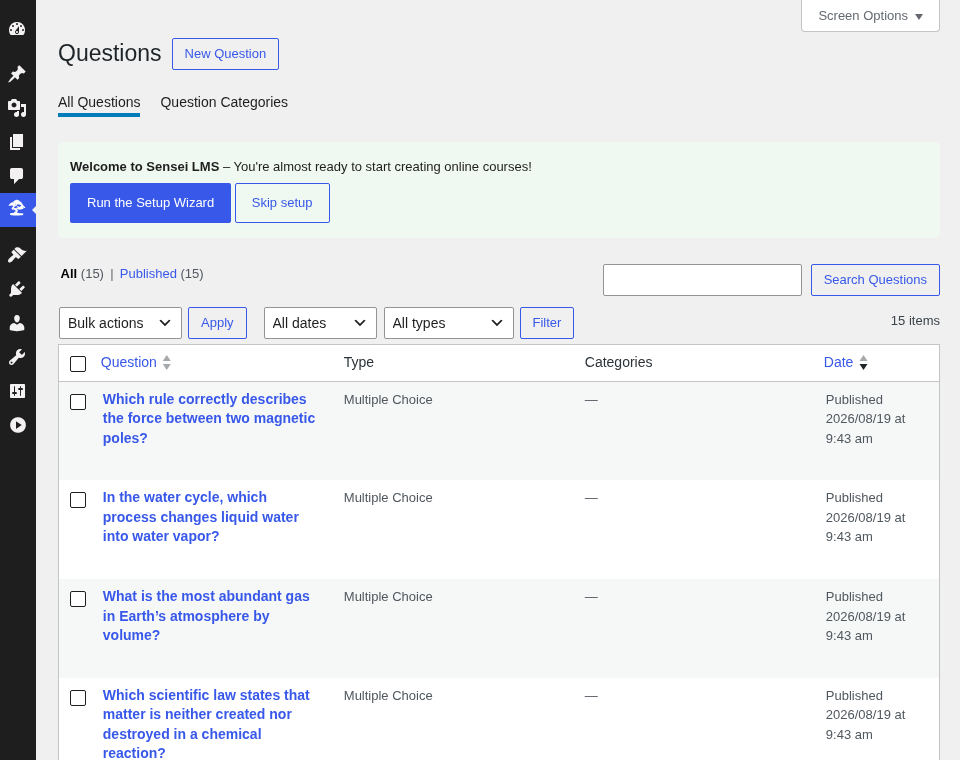
The plugin is free from the WordPress.org directory, and the free package is all that was installed on the bench. Sensei’s own admin home quotes the paid tier verbatim in its Upgrade to Sensei Pro panel as $179 USD per year, 1 site, captured 2026-08-19. The capabilities the free tier hands to that upgrade, as observed in the admin UI, are the ordering question type, the quiz timer, flashcards, image hotspots, checklists, AI question generation, and commerce through Sensei Pro or WooCommerce selling. WooCommerce was never installed: only sensei-lms is active on the subsite, and Sensei’s setup wizard was dismissed with Skip onboarding, so nothing was connected or downloaded. No paid, nulled, or trial code was installed on the showcase bench. See the licensing and value notes for the showcase rule.
Live coverage summary: Standard Ten (Q1–Q10)
| Question | Type | Status |
|---|---|---|
| Q1 | Single-answer MCQ | ok |
| Q2 | Single-answer MCQ | ok |
| Q3 | Single-answer MCQ | ok |
| Q4 | Single-answer MCQ | ok |
| Q5 | Single-answer MCQ | ok |
| Q6 | Single-answer MCQ | ok |
| Q7 | Multiple-correct | ok |
| Q8 | True / false | ok |
| Q9 | Fill-in | ok |
| Q10 | Ordering | pro-gated |
Nine of the Standard Ten are expressible in the free tier, a count matched on the roster only by HD Quiz and Chained Quiz, and Sensei is the only one of those three whose tenth question is pro-gated rather than simply absent from the free question model. Sensei’s free quiz block offers exactly six question types — Multiple Choice, True/False, Gap Fill, Single Line, Multi Line, File Upload — and Q1–Q6 were authored as single-answer Multiple Choice items with four verbatim options each. Q7 is a Multiple Choice question with two correct options, Argon and Neon: Sensei stores _right_answer_count = 2 and the front end switches those inputs to checkboxes, which the live benchmark page confirms with nine #sensei-quiz-list > li items, 26 radios, and 4 checkboxes. Q8 is a True/False item with true correct.
Q9 uses Gap Fill, which is a sentence with a gap rather than a bare answer: Sensei drops a gap-fill question from the quiz unless the gap plus the text before or after it are filled (Sensei_Quiz::is_gap_fill_question_complete), so the Standard Ten wording stays the question title and the gap sentence is The chemical symbol for iron is || Fe || .. Grading is case-insensitive by Sensei’s default and the free plugin exposes no case-sensitivity switch; Sensei_Grading::grade_gap_fill_question lowercases both sides unless a developer adds the sensei_gap_fill_case_sensitive_grading filter. That default was proven live: the answer was typed as lowercase fe and graded Correct 1/1.
Q10 is pro-gated, not unsupported and not faked. The question-type selector renders a seventh entry inside the disabled container sensei-lms-question-block__type-selector__option__container--disabled, reading Ordering / Place the answers in the correct order. / Upgrade to Sensei Pro and linking to senseilms.com with utm_campaign=quiz_ordering_question_type. No ordering type exists in the free tier, so Q10 was left unauthored and no substitute type was passed off as ordering.
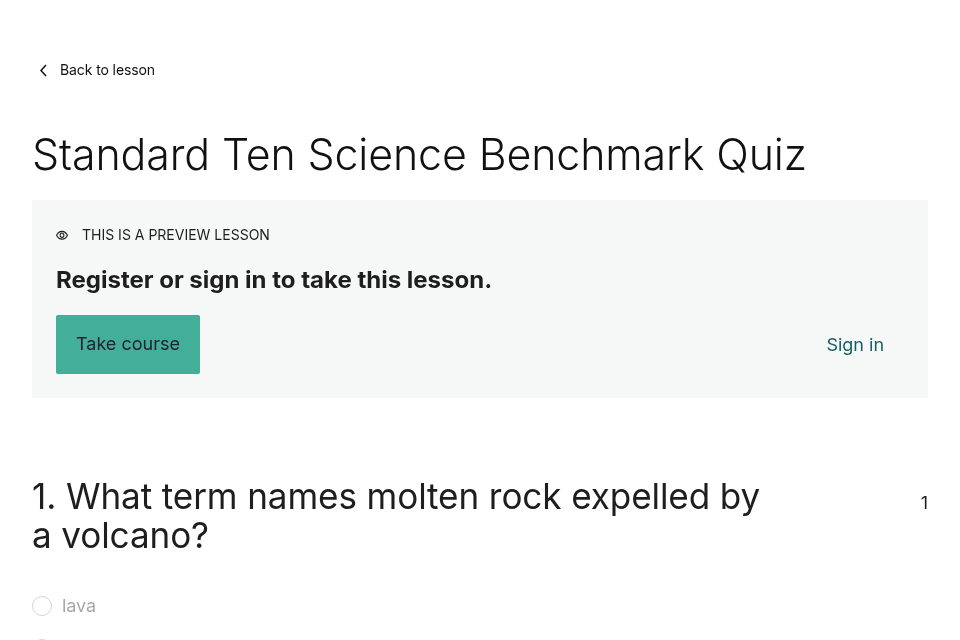
completionPass is recorded false. With Access Permissions — Users must be logged in to view lesson content. unchecked and both lessons marked Allow this lesson to be viewed without login, an anonymous visitor does receive the whole quiz — but every answer input carries disabled, Sensei prints THIS IS A PREVIEW LESSON with Register or sign in to take this lesson. and the Take course / Sign in actions, and no Complete Quiz button appears anywhere in the response, because Sensei_Quiz::action_buttons() returns early unless the visitor is enrolled and enrolment requires an account. Those two switches are the only free-tier access controls Sensei offers: they open viewing, not submitting. An enrolled attempt of the same nine answers graded Your Grade: 100%, so the engine grades correctly; the failing condition is anonymity, not capability.
For the full cross-plugin matrix, see the comparison index; for the other thirteen roster dossiers, see the plugin index.
Runtime measurements
Captured 2026-08-19 on the Core-Six page, Chromium with cache disabled, logged-out, networkidle2.
| Metric | Value |
|---|---|
| URL | https://wpqp.loca.zone/sensei/benchmark-core/ |
| Total requests | 10 |
| JS files / bytes | 2 / 16,924 |
| CSS files / bytes | 5 / 46,914 |
| Total transfer | 144,795 bytes |
| jQuery loaded | no |
| DOM nodes | 137 |
| WordPress / PHP | 7.0.4 / 8.3.33 |
These outer-document figures exclude the quiz frame, and the reason is a Sensei design fact rather than a measurement shortcut: Sensei ships no quiz shortcode and its quiz block renders nothing outside a quiz post (Sensei_Block_Quiz::render_quiz() returns an empty string), so /sensei/benchmark-core/ embeds the native quiz permalink in an iframe. Measured under the same method, that permalink — https://wpqp.loca.zone/sensei/quiz/core-six-science-benchmark/ — came to 17 requests, 5 JS files / 44,630 bytes, 9 CSS files / 59,104 bytes, 145,175 bytes total transfer, and 226 DOM nodes. Read the quiz-frame numbers, not the outer page, when comparing Sensei’s weight against plugins that render a quiz inline.
This row was captured against WordPress 7.0.4, which the container reached through core auto-updates after the pinned 7.0.2 image was provisioned; the original ten rows keep their 2026-08-03 values against 7.0.2. Plugin versions remained pinned throughout. See the comparison index for the full runtime-weight comparison.
Signature-feature walkthrough
The Sensei subsite demonstrates the course-lesson-quiz chain with grading, all in the free tier:
- Native course scaffolding — the course
Physical Sciences Benchmark(post 27) was built through Sensei’sCreate your coursewizard withContinue with Sensei Free, and carries two lessons:Standard Ten Science Benchmark(post 30, quiz post 31, nine question posts 41–49) andCore Six Science Benchmark(post 32, quiz post 33, six question posts 54–59). Quiz settings are auto-grade, pass mark 0, retakes allowed, fixed question order, one point per question, with all three failed-attempt reveal options left on. - Course page embed — the signature page renders Sensei’s own shortcode
[sensei_course_page id="27"], which produces the course page with its Course Outline block listing both lessons and their quizzes. The live page reportsCurrently completed 1 lesson of 2 in total 50% In Progressand links to both native lesson URLs. - Graded attempt with per-question feedback — one enrolled attempt submitting all nine correct answers returned
Your Grade: 100%,You've passed the quiz and can continue to the next lesson., theContinue to next lesson/Restart Quizactions, andCorrect 1/1on every question alongside its explanation, for exampleIron's symbol Fe comes from the Latin ferrum.Each question post carries Sensei’s ownsensei-lms/quiz-question-feedback-correctandsensei-lms/quiz-question-feedback-incorrectblocks holding the canonical Standard Ten explanation. - Free assessment administration — the grading queue, Reports with CSV export, and Tools CSV import/export of courses, lessons, and questions are all present in the free plugin under Sensei LMS → Tools and Reports, recorded as a live-observed claim in the incumbent-claims evidence. Assessment data stays in the WordPress database; no external service was configured.
Coexistence
Sensei LMS 4.26.2 activated cleanly on its own subsite and on the fourteen-plugin coexistence lab, with no fatal, no page error, and no new debug line — including alongside Tutor LMS and Academy LMS, the other two LMS engines. No setting change was needed, so the pre-decided LMS fallback ladder that Tutor’s ecommerce engine required was never used here. Sensei contributes one top-level admin menu item, Sensei LMS, one of the thirteen plugin menus in the lab’s 23-item admin menu. All fourteen lab iframes loaded, and Sensei’s tile nests one further document inside itself — https://wpqp.loca.zone/sensei/quiz/core-six-science-benchmark/ — which the capture records as a nested frame rather than a fifteenth iframe, because Sensei’s Core-Six page embeds the native quiz permalink. The logged-out load added zero lines to the debug log, and the only console error in the capture belongs to H5P. See the comparison index for the full coexistence lab report.
Catches
- Ordering is the single Standard Ten type the free tier cannot express, and Sensei shows the boundary rather than hiding it: the disabled selector entry reads
Ordering / Place the answers in the correct order. / Upgrade to Sensei Pro. Buying it means the$179 USD per year, 1 sitetier. - Anonymous visitors cannot take a quiz. Viewing is openable, submitting is not:
THIS IS A PREVIEW LESSON/Register or sign in to take this lesson.with disabled inputs and noComplete Quizbutton. Any public, lead-capture, or link-shared quiz use case is out of scope for the free tier. Gap Fillis a sentence-with-gap type, not a plain short answer, and a gap-fill question is silently dropped from the quiz if the gap and its surrounding text are not filled. Case-insensitive grading is the default and is only changeable through thesensei_gap_fill_case_sensitive_gradingfilter, so a case-sensitive answer key needs code.- There is no quiz shortcode and the quiz block renders nothing outside a quiz post, so putting a quiz on an arbitrary page means linking or iframing the native quiz permalink. That also splits runtime measurement between the host page and the quiz frame.
- Sensei’s block editor leaves one blank trailing
sensei-lms/quiz-questionblock in lesson content after a save — lesson 30 shows ten question blocks and lesson 32 seven — while the quizzes hold exactly nine and six questions server-side and the front end renders nine and six. - Authoring disclosure: one step did not go through the Gutenberg canvas. Every question, answer, quiz setting, and explanation was authored in the lesson block editor, but the editor page for lesson 30 became unresponsive while lesson content and quiz post disagreed about the feedback blocks. Quiz 31’s nine feedback paragraphs were therefore committed by calling Sensei’s own block-editor endpoint from the same admin session —
GETthenPOST /wp-json/sensei-internal/v1/lesson-quiz/30with the structure the plugin itself returned, exactly the request the quiz block sends on save, answering HTTP 200 with nine questions echoed back. Quiz 33’s feedback went through the editor’s ownsensei/quiz-structuresave action. No SQL and no wp-cli writes touched any quiz, question, answer, or feedback row; wp-cli only created the four pages, set the front-page options, and read state back for verification. - Maintenance signals are the weakest part of an otherwise strong record: the rating sub-score of 7.0 (70 / 100 from only 40 ratings) and the active-installs sub-score of 6 (10,000 installs) are what hold maintenance below 10 while update recency, support resolution, and tested compatibility all score 10.
Audit score
Using the rubric weights, with categories scored mechanically from the 2026-08-19 live capture:
| Category | Score |
|---|---|
| Depth | 8 / 10 |
| Author / learner UX | 8 / 10 |
| Logic / results / reporting | 10 / 10 |
| Maintenance / trust | 8.6 / 10 |
| Integrations / data ownership | 8 / 10 |
| Value | 8 / 10 |
| Weighted total | 84.90 / 100 |
Maintenance sub-scores: update recency 10, active installs 6, rating 7.0, support resolution 10, tested compatibility 10.
84.90 is the highest weighted total of the fourteen roster members, ahead of Tutor LMS at 83.74 and Quiz Maker at 83.24. That ranking carries a documented caveat: the rubric’s expansion note records that the four 2026-08-19 entries were scored mechanically, each category equal to twice the number of its five criteria satisfied by free-tier live observation or an explicitly free documented capability with pro-gated and unevidenced criteria scoring zero, while the original ten keep their 2026-08-03 documentation-tier category judgments — “so cross-cohort score gaps of a few points are method noise, not merit.” Sensei’s lead over the plugins immediately behind it sits inside that noise band; its nine-of-ten free coverage and its full free grading and reporting stack do not.
Verdict
Sensei LMS is the strongest free engine on the bench for course-based assessment. It expresses nine of the Standard Ten without paying, grades multiple-correct and gap-fill answers correctly, returns per-question feedback and a percentage grade, and ships the grading queue, reports, and CSV portability that most roster plugins sell as add-ons — all five of the rubric’s logic-and-results criteria are satisfied by free-tier observation, which is what puts that category at a full 10. Two costs are non-negotiable in the free tier: no anonymous attempts, because submission requires course enrolment and therefore an account, and no ordering questions without the $179 USD per year, 1 site upgrade. It is the right choice for a membership-style course site with registered learners who should be graded and tracked, and the wrong choice for a public, anonymous, or lead-capture quiz, where a lighter standalone quiz plugin will do the job Sensei deliberately gates behind enrolment.
Visual evidence
Captured 2026-08-19 in desktop Chromium. Each crop removes browser chrome and unrelated page furniture while retaining the complete visible plugin surface.